How to Call from Your PC
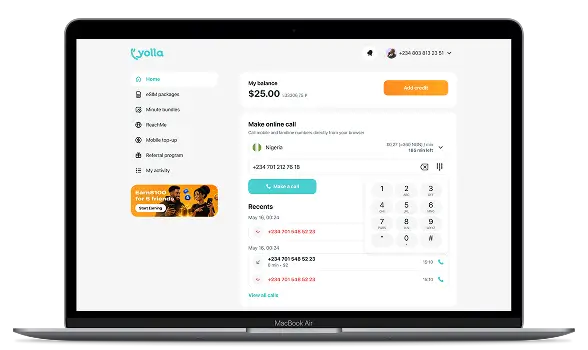
Making internet calls is simple with Yolla Web. Create your account, add credit to your balance, enter the number in international format, check the rate, and start your call.
Create Your Yolla Account
Create your Yolla account, or sign in to an existing one. The same login details work for Yolla Web and the mobile app.
Add Credit
Add credit before calling. Your balance is shared between Yolla Web and the mobile app, so you can use it with either.
Enter the Number, Check the Rate
Enter the phone number in international format, including the country code. Check the per-minute rate displayed before you call.
Start Your Call
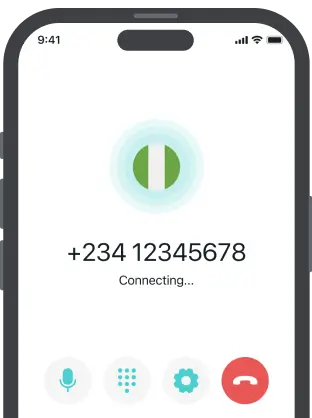
Select Call to start. The recipient receives a regular phone call and does not need a Yolla account or an internet connection.
What Are the Features and Benefits of Yolla Web?
Yolla Web lets you call from your browser without downloading, installing, or updating software. Browsers, including Chrome, Safari, Firefox, and Edge, are supported. All you need to make a call from a laptop, desktop, mobile, or tablet is a microphone and an internet connection. Same Yolla account, credit, and features will work in your app.
Transparent Rates
See the price per minute before you dial, so you can check the cost and decide how much credit you need.
Outbound Calls Worldwide
Use Yolla Web for outbound calls to mobile and landline numbers worldwide. The person you call receives the call through their regular phone service.
Recipients Don't Need the App
The recipient receives a regular phone call and does not need a Yolla account, internet connection, or installed app to answer and speak with you.
One Account and Balance
Use the same Yolla account and shared balance in the mobile app and Yolla Web. Your credit remains available whichever option you use.
Clear Call Quality
Yolla Web is designed for clear audio when you make calls through the internet. Call quality depends on the stability of your connection.
Private and Secure
Yolla Web uses an encrypted connection when you sign in or place calls. This helps protect your account information and communications.
Rates for Popular Destinations
Yolla's rates vary by destination and number type. Check the table below for current prices to selected countries, with separate rates for mobile and landline calls.


FAQ
Can I make phone calls from my computer without downloading an app?
Yes. Yolla Web lets you place calls without installing software. Sign in through the website, add credit, and enter the number you want to reach. The person you call receives a regular phone call, so they do not need Yolla or an internet connection.
How do I make a call from my browser?
To make internet calls with Yolla, sign in to Yolla Web, choose the country, and enter the phone number in international format. Check the displayed rate, then select Call. Yolla routes the call online and connects it to the recipient’s carrier network as a regular phone call.
Can I call mobile and landline numbers?
Yes. Yolla Web connects outgoing calls to regular mobile and landline numbers worldwide. The person receiving the call can answer through their normal phone service. They do not need to create a Yolla account, install an app, or have an active internet connection.
Does the person I call need Yolla or the internet?
No. Calls to regular numbers arrive through the recipient’s usual phone network. The person you call does not need Yolla, an installed app, or an internet connection. Only the caller needs internet access to place the call through Yolla Web.
Can I receive calls in the browser?
No. Yolla Web supports only outbound calling through the same account used by the mobile app. Sign in to view the calling options available to you. Your balance and account details remain shared between the app and web service.
Does Yolla Web offer free calls?
Yolla-to-Yolla calls are free when both people use the mobile app and have an internet connection. Calls over the internet to regular mobile and landline numbers are charged per minute. Yolla shows the current rate before you dial, so you can check the cost before calling.
How much does it cost to call from a computer?
The price depends on the destination and whether you are calling a mobile or landline number. The current per-minute rate appears before you place the call. You can also check the destination table or open the relevant country rate page for the latest price.
Do I need the Yolla app?
No. You can create an account, add credit, check rates, and place calls directly through Yolla Web. If you already use the mobile app, sign in with the same account. Your profile and balance are shared, so you do not need to register again.
Can I use Yolla on a Mac?
Yes. Open Yolla Web in a supported browser and sign in to your account. A laptop needs a microphone and a stable internet connection for calls. Nothing needs to be installed, and you can use the same balance already available in the mobile app.
How do I sign up?
Open Yolla Web and select Sign up. Enter the requested details and verify your account, then add credit when you are ready to call. If you already have a Yolla account through the mobile app, use those login details instead of creating another account.